
What is the audit log?
The audit log is the time-stamped record of everything that has happened in your space: Who connected a source, who invited whom, who created or revoked a token, who published an Insight. It is the place to answer who changed this, and when without asking around.
Entries are kept for 30 days, then removed automatically.
The audit log is part of the Pro plan. On other plans the page shows an upgrade note.
Where do I find it?
Click the gear icon at the bottom of the left rail to open
Settings.Under
Security, clickAudit log.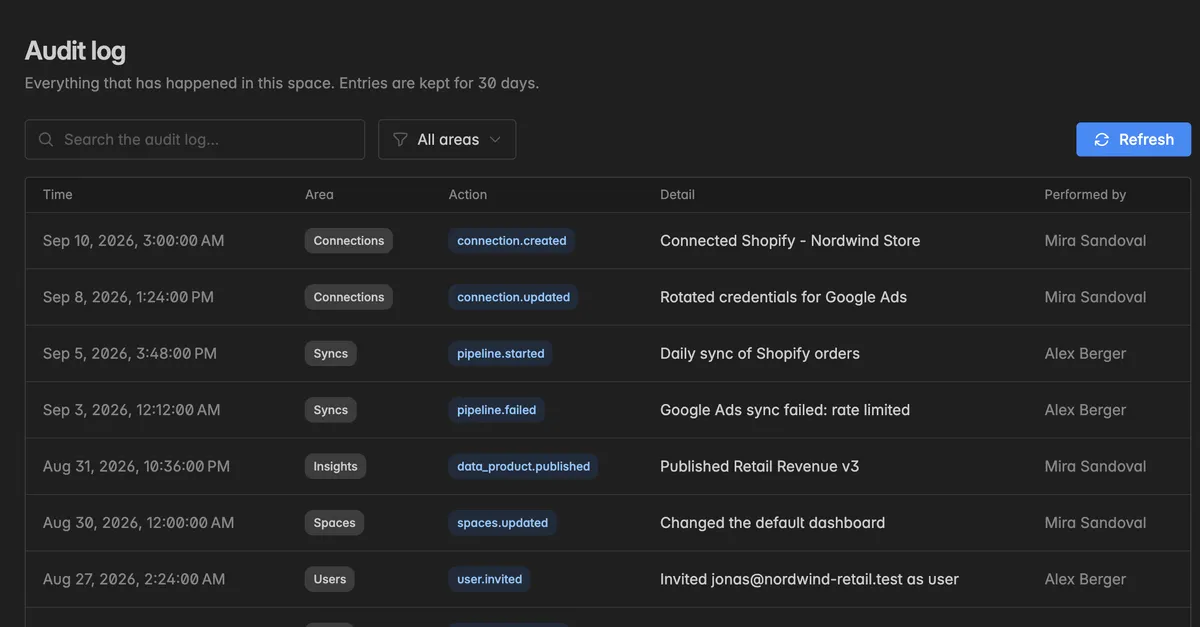
What does an entry contain?
Column | What it shows |
|---|---|
Time | When it happened |
Area | The kind of object: Connections, Syncs, Insights, Spaces, Users, Service users, or API tokens |
Action | The event, for example |
Detail | What happened in plain words, with the names of the affected objects |
Performed by | The member who did it. Anonymous for events triggered from outside, for example when another space accepts an invitation |
Sync runs and failures show up under Syncs, so the log also tells you when a connection last failed and why.
How do I find an entry?
Type into Search the audit log to filter by keyword, for example a connection name, a token name, or a member.
Open All areas to narrow the list to one area, for example only API tokens.
Click Refresh to pull the latest entries.
Troubleshooting
The page shows an upgrade note
The audit log needs the Pro plan. See Billing.
I cannot find an event from last month
Entries older than 30 days are gone. If you need long-term records for compliance, export what you need within the retention window.
An entry says Anonymous
The action was triggered by someone outside your space, for example an admin of another space accepting a shared Insight or a connect invite.
Who can see the audit log?
Every member of the space can open it. Sensitive values such as token values never appear, only names and actions.